


How the Onboarding Process Can Be Simplified with RPA (Robotic Process Automation)
Robotic Process Automation (RPA) is a key component in streamlining daily processes in the human resources domain that are ...
Before diving into our installation tips, here is what has changed in the SAP Business One landscape heading into 2026 that directly affects any new deployment:
SAP Business One FP 2602 (Feature Pack, released early 2026) is the latest stable version building on Version 10.0 with expanded Web Client coverage, HANA performance improvements, and enhanced cloud management tools.
SAP Business One Version 11 is in planning for 2027, meaning Version 10.0 remains the active, fully supported installation target for all UK deployments in 2026.
The Web Client is now the primary interface focus SAP has expanded it to cover production, inventory, purchasing, sales, reporting, and administration in a browser with no desktop client required.
A new Cloud Control Centre has been introduced for multi-tenant SAP B1 environments, simplifying management for hosted and cloud deployments.
AI-assisted insights (via SAP Business AI) are now embedded directly into dashboards and workflows not a bolt-on.
Making Tax Digital (MTD) for Income Tax comes into effect from April 2026 for the self-employed and landlords UK localisation updates are included in FP 2602.
SAP Business One installation is one of the most significant ERP investments a UK SME can make. With the 2026 feature pack (FP 2602) now live and the platform accelerating its shift to a browser-first Web Client, getting your installation right from day one has never been more important or more achievable. A poorly planned rollout still means costly delays, data integrity problems, and frustrated teams. A well-planned one sets your business up for the next decade.
In this guide, we share five proven tips for a successful SAP Business One installation in 2026 covering pre-project planning, deployment model selection, data migration, user adoption, and post-go-live support. These apply whether you are a first-time implementer or migrating from an older on-premise version.
A structured pre-installation assessment is the single biggest predictor of a smooth go-live. It is also the stage most frequently underestimated by UK businesses. Before a single licence is activated, your assessment should cover:
Current business processes
: map every workflow SAP B1 will replace or automate, including purchase orders, sales orders, stock control, and financial reporting.Infrastructure readiness
: confirm server specifications (or cloud subscription tier) meet SAP’s 2026 requirements, particularly for SAP HANA. If you are moving to the Web Client as your primary interface, browser compatibility and network bandwidth become key considerations.Existing data quality
: run a data audit on your current system before migration planning begins. Poor data quality is the leading cause of post-go-live problems.Add-on and integration requirements
: identify third-party tools (CRM, e-commerce, payroll, Microsoft 365) that need to connect with SAP B1. Check add-on compatibility against FP 2602 before committing.Regulatory compliance
: ensure your setup supports Making Tax Digital for VAT and the new MTD for Income Tax requirements effective April 2026 under UK HMRC rules.A certified UK SAP Business One partner will typically provide a free pre-sales assessment. Use it. The information gathered here directly shapes your project plan, timeline, and budget.
In 2026, the deployment conversation has shifted decisively. SAP’s 2026 roadmap confirms that cloud and flexible deployment options are receiving the majority of new investment and the new Cloud Control Centre makes managed cloud hosting more capable and easier to administer than ever before.
The preferred choice for the majority of new UK installations in 2026. Lower upfront cost, automatic feature pack updates (FP 2602 and beyond), and predictable monthly fees. Hosted on Microsoft Azure or SAP-approved data centres, both with UK data residency options to meet UK GDPR requirements. The new Cloud Control Centre released in early 2026 provides centralised tenant management, SSO, two-factor authentication, and platform support oversight from a single console.
Still a valid choice for businesses with existing server infrastructure, strict data sovereignty requirements, or complex custom developments. However, be aware that SAP’s active development focus is now firmly on the Web Client and cloud architecture on-premise deployments will require more effort to stay current as Version 11 approaches.
Suits businesses with remote sites or warehouses needing local processing alongside central cloud management. SAP continues to support hybrid models in its 2026 roadmap.
Key 2026 advice: Do not default to on-premise out of habit. Cloud deployment now offers equivalent and in many areas, superior functionality for most UK SMEs, with significantly reduced IT overhead.
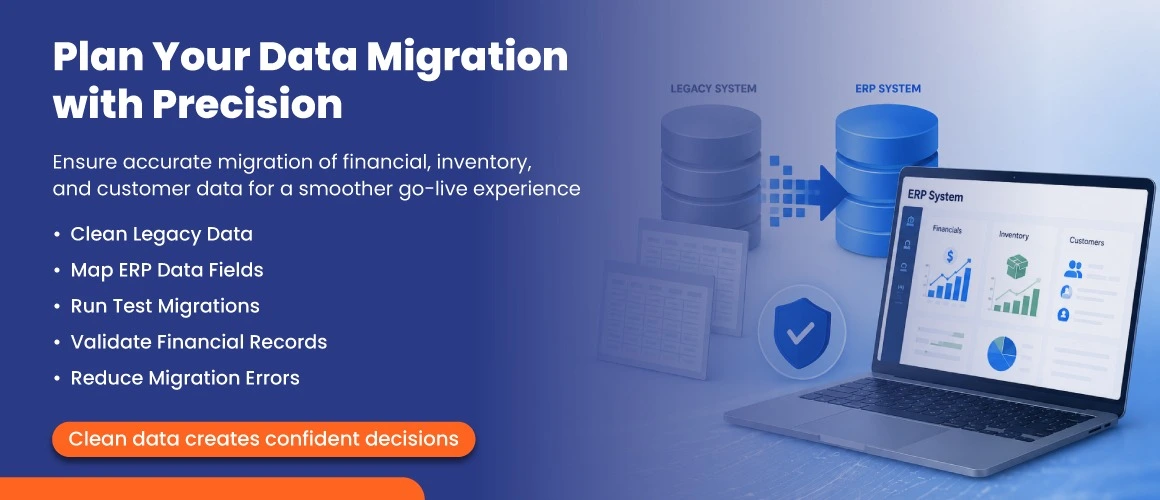
Data migration remains the most technically challenging phase of any SAP Business One installation. Businesses that rush it pay for it with incorrect opening balances, missing customer records, or broken stock levels that can take weeks to resolve after go-live.
Follow this proven migration sequence:
Remove duplicates, correct formatting errors, and archive historical data you will not need live. The less legacy data you migrate, the faster and cleaner the process.
Work with your partner to produce a data mapping document. Every field in your legacy system needs a home in SAP B1 some will need transformation or splitting.
The DTW is SAP’s official migration tool. The 2026 version includes improved error logging and supports bulk import of business partners, items, opening balances, and transaction histories. The expanded Excel import options in FP 2602 also make Web Client data administration tasks easier post-go-live.
Perform at least two full test migrations before go-live. Validate totals, spot-check records, and confirm that reports match your legacy system.
Set a clear cut-off point after which no new data enters the legacy system. This prevents reconciliation problems on go-live day.
Pro tip: Always migrate financial opening balances as at month-end or year-end to simplify reconciliation with HMRC and your accountants.
Technology alone does not make an ERP project succeed people do. In 2026, there is an added training consideration: the Web Client is now SAP’s primary development focus and covers production, inventory, purchasing, sales, reporting, and administration in the browser. Many new UK deployments are going Web Client-first, which changes how training should be structured.
Best practices for 2026 SAP B1 training:
Train on the Web Client first
: the SAP Fiori-designed Web Client (refined in FP 2602) is cleaner, faster, and easier for new users. If your deployment is cloud-hosted, your team may never need the legacy Desktop Client at all.Role-based sessions
: tailor training to how each team uses SAP B1. Finance users, warehouse teams, and sales staff need different workflows covered. Generic system demos waste time.Introduce AI-assisted features early
: SAP Business AI is now embedded in dashboards and workflows in 2026. Show users how to use AI-assisted analytics to spot stock anomalies, flag cash flow trends, and automate routine reconciliation tasks.Designate super users
: identify one or two power users per department who receive deeper training. They become your internal first line of support and adoption champions.Schedule a post-go-live refresher
: after four to six weeks, run a short session to address real-world questions arising from daily use.Budget for training properly allocate 15 to 20 per cent of your total project budget to training and change management. It consistently delivers the strongest return on your implementation investment.
Go-live is not the finish line it is the start of the next phase. The first 30 to 90 days after go-live are the most critical for stability, user confidence, and data accuracy. Having robust UK-based support in place before you switch on is non-negotiable.
What to look for in a UK SAP B1 support partner in 2026:
Certified SAP Gold or Platinum Partner status
: guarantees consultants hold current certifications and have access to SAP’s latest resources, patches, and FP releases.UK-based support desk
: time zone alignment matters for fast issue resolution. Ensure your SLA covers UK business hours as a minimum.Proactive feature pack management
: SAP typically releases two to three feature packs per year. Your partner should notify you of FP releases, assess compatibility, and manage the upgrade process on your behalf.2026 MTD readiness
: your partner must be up to date on HMRC’s Making Tax Digital obligations, including the April 2026 MTD for Income Tax rollout and ongoing MTD for VAT compliance within SAP B1.Version 11 roadmap guidance
: with SAP Business One Version 11 planned for 2027, your support partner should be tracking the roadmap and advising you on what it means for your current installation and future upgrade path.Defined SLAs
: clear response and resolution times for critical (system down), high-priority (key process blocked), and standard requests.Ask for UK customer references in your sector before signing. A partner who has guided similar businesses through their first year on SAP B1 and through FP upgrades is worth more than one with generic credentials.
If you are installing SAP Business One for the first time in 2026, you will be deploying one of the most capable versions in the platform’s history. Here are the highlights from FP 2602 and the 2026 roadmap that matter most for UK businesses:
The Web Client now covers production, inventory, purchasing, sales, reporting, and administration all in-browser with no desktop client required. SAP’s goal is full desktop parity ahead of Version 11 in 2027. Expanded Microsoft Excel import options for journal entries, business partners, items, batches, and serial numbers make Web Client data administration far more practical. Many UK customers are now using the Web Client as their default daily interface.
SAP Business AI Q1 2026 updates bring intelligent insights directly into core workflows. Finance teams benefit from AI-assisted anomaly detection, automated reconciliation suggestions, and cash flow trend alerts. Warehouse and operations teams can identify slow-moving stock automatically. These features are embedded in dashboards no separate AI tool or configuration required.
A new purpose-built management console for cloud and hosted SAP B1 environments. Provides centralised tenant management, SLD integration, SSO and two-factor authentication controls, and platform health oversight all from one place. For UK businesses on managed hosting, this means faster provisioning, more consistent security policies, and smoother feature pack updates.
FP 2602 introduces improved identity provider (IdP) integration, single sign-on (SSO), and two-factor authentication across the platform. For UK businesses subject to Cyber Essentials or ISO 27001 requirements, these updates significantly strengthen SAP B1’s security posture without adding friction for end users.
SAP’s UK localisation team has released updates in FP 2602 to support MTD for Income Tax, which comes into effect for sole traders and landlords in April 2026. This builds on the existing MTD for VAT functionality that UK SAP B1 users have relied on since 2019. If your business has directors or partners with relevant income, ensure your SAP partner has activated these localisation updates.
SAP has confirmed that Version 11 is planned for 2027 and will introduce improved cloud architecture, simplified system management, and enhanced scalability. Version 10.0 (with FP 2602) remains the active, fully supported installation target for all deployments in 2026. If you are installing now, you are not falling behind Version 10.0 will receive continued support and updates throughout the Version 11 transition.
A successful SAP Business One installation in 2026 comes down to five things: thorough preparation, the right deployment model, clean data migration, engaged users trained on the Web Client, and reliable UK-based support. Each tip in this guide addresses a real risk that derails ERP projects and each is within your control with the right partner.
With FP 2602 live, embedded AI tools available, the Web Client maturing rapidly, and Version 11 on the 2027 horizon, there has never been a better time to invest in SAP Business One. Silver Touch Technologies UK is a certified SAP Business One partner with over two decades of UK implementation experience. Whether you are planning your first installation or moving to the cloud, our team is here to guide you every step of the way.

An experienced business leader, heads the UK operations of Silver Touch Technologies Ltd. With 15 years of experience in the industry, he has set the track record of delivering transformation and revenue growth with SAP Solutions.